

Homework Access
All homework is assigned through Microsoft Teams: https://teams.cloud.microsoft/
Some tasks may require students to access additional learning platforms:
|
Seneca Sparx Reader Sparx Maths Sparx Science |
Students should sign in to all platforms using their school Microsoft account. Their school email address is their username followed by @huishepiscopi.org and they should use the same password they use to log in to school computers.
Parent / Carer Homework Summaries
Parents and carers will receive emails detailing their child's assignments from the previous week, including the statuses of turned in or missing work.
The summary also includes the forthcoming week's due dates so that families can plan ahead. Each student's assignment data is private and only shared with their parents or carers.
Recovery Room Work
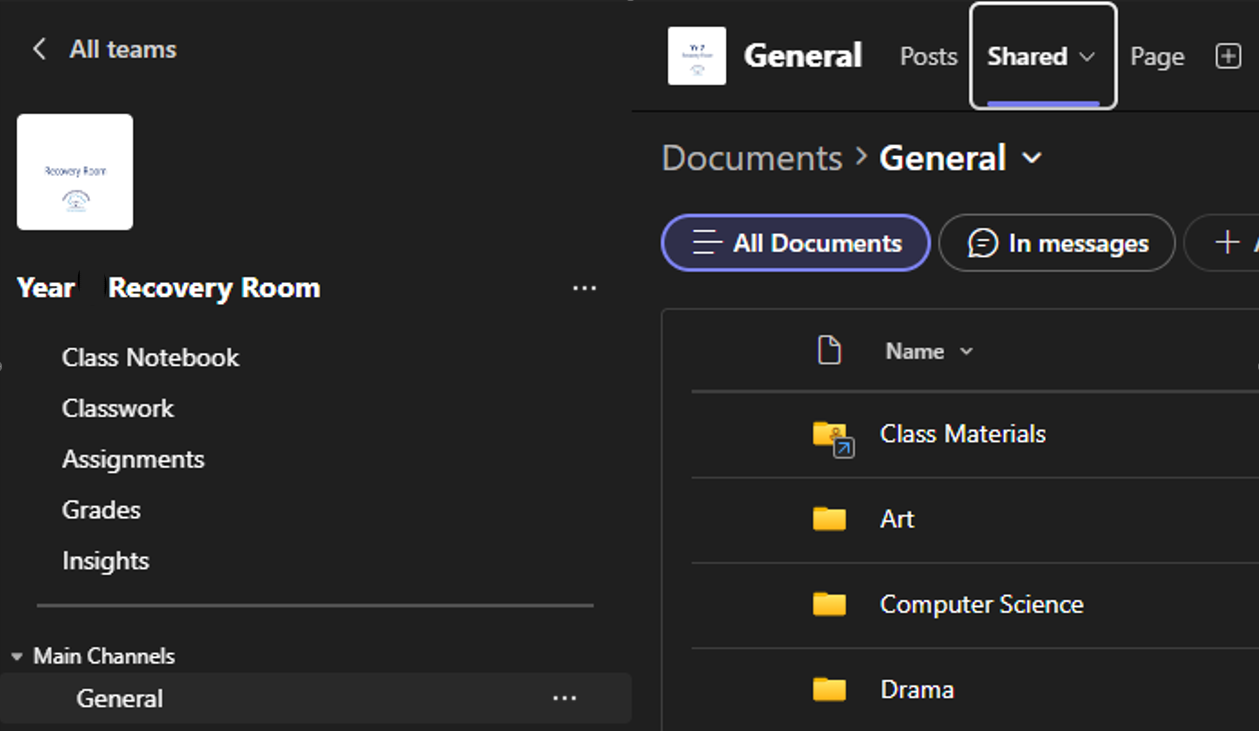
How to Find Your Recovery Room Work
- Open the General channel in the corresponding Recovery Room Team.
- Select the Shared tab at the top of the screen.
- Open the folder for the subject you are working on.
- Access and complete the work provided in the relevant subject folder.
Microsoft Teams Guidance
Microsoft Teams Guidance
Knowledge Organisers
Knowledge Organisers | Autumn Term 1 2026